Warm-up ramp: why a new mailbox starts at 3 emails a day
Why a new mailbox has to start slowly, why Coldoutbound's warm-up ramp goes 3, 6, 9 up to 20, and what happens when a receiving server pushes back.
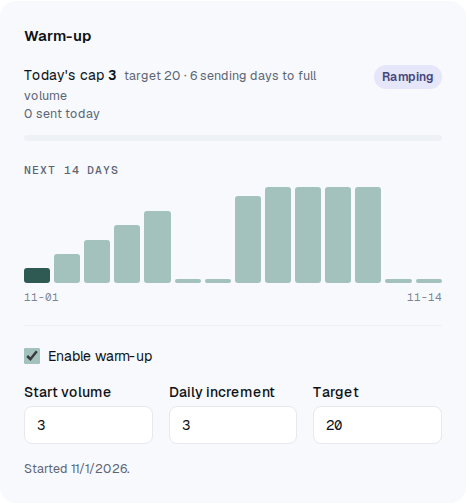
The warm-up ramp is a daily limit that starts low and rises slowly, so a new mailbox builds a track record before it sends at full volume. In Coldoutbound it starts at 3 emails a day, adds 3 on each day the mailbox sends, and stops at 20.
Why a new mailbox has to start slowly
Gmail and Outlook decide where your email lands partly from what they have seen you send before. A new mailbox has no history, so they watch it closely.
A bank treats a new account the same way. Small, regular deposits look normal. A large sum on day one gets the account checked.
A new address that suddenly emails hundreds of strangers looks like a spammer, because that is what spammers do. Google puts it plainly: "Increasing your sending volume too quickly can result in delivery issues." In practice, that means emails delayed, sent to spam or refused. Gmail also tracks spam for your whole domain, the part of your address after the @. So a bad start can follow every mailbox on that domain, not only the one that sent.
Why the warm-up ramp goes 3, 6, 9 and stops at 20
Adding a fixed 3 a day means each step is a smaller share of what you already send. That matches what Google says about raising volume. It names "a common daily increase of 25% to 100%", and adds: "The more email that you send, the more slowly you should increase sending volume."
| Sending day | Daily limit | Rise from the day before |
|---|---|---|
| 1 | 3 | |
| 2 | 6 | +100% |
| 3 | 9 | +50% |
| 4 | 12 | +33% |
| 5 | 15 | +25% |
| 6 | 18 | +20% |
| 7 | 20 | +11% |
So a new mailbox reaches 20 a day on its 7th sending day. If it starts on a Monday and sends Monday to Friday, that's the Tuesday of the following week.
It starts at the top of Google's range and drops below it. Other patterns do worse:
- Doubling (3, 6, 12, 24): every step is +100%. The pace never slows down as volume grows, which is what Google warns against.
- 2, 3, 5, 7: about +50% every day. The steps keep getting bigger as you send more.
- 1, 2, 3, 4: safe but slow: 20 sending days to reach 20, or four weeks of Mondays to Fridays. Microsoft expects a new IP address to be "fully ramped within a couple of weeks or less".
The 20 is our own choice. Google and Microsoft set limits on what an account can send, but neither gives a safe number for cold email. Google's advice assumes "people who subscribe to your emails", and cold email never has that. So we keep each mailbox small. You can change the number.
It counts the days you send, not the calendar
A day moves the ramp only if the mailbox sent on it, on whichever days you have set. A mailbox that sent 15 on Friday can send 18 on its next sending day, whether that's Saturday or Monday. Pause it during the ramp and it picks up where it stopped.
Where to see it
Click Mailboxes in the sidebar and open a mailbox. The Warm-up card shows Today's cap, how many emails went out today, how many sending days are left until full volume, and the next 14 days. The low stubs in the chart are days it doesn't send, and on those days the card says No sending today. This mailbox is on its first sending day, so the chart shows the whole climb to 20.
What changes on a brand-new domain
Filters are wary of new domains, because spammers tend to use domains soon after registering them. In a study of spam domains from 2012, 35–40% were under 30 days old when they first showed up on a spam list or in a spam trap.
So nothing goes out in the first 24 hours after a domain is registered. That number is our own precaution. We can't see the date for some domains, including .eu, so those aren't held.
After that, a new domain follows the same ramp as any other mailbox. Neither Google nor Microsoft gives it a different one.
What happens when someone pushes back
A receiving server asks you to slow down. Your email provider keeps retrying a delayed email and may send a "delivery delayed" notice to the mailbox. Sometimes the notice says the problem is you, such as an unusual rate of unsolicited mail or a poor reputation. Then Coldoutbound follows Google's advice: "send messages at a volume below the initial deferral volume for 24 hours".
If the delayed email was the mailbox's 10th that day, it sends at most 9 a day today and tomorrow, then climbs again: 12, 15, 18. Every mailbox on that domain steps back, the mailbox page says why, and your team gets an email.
If the notice says their server is down or their inbox is full, nothing slows down. That isn't about you.
Your own provider says "try again later". The mailbox waits 15 minutes, then an hour if it happens again, and retries that email first. A third time in 24 hours pauses the mailbox and tells you.
Too many emails bounce. A mailbox pauses itself when 5% of its last 40 emails went to addresses that don't exist, or 3% were refused as spam or by policy. The reason is at the top of its page. Fix the cause, then click Resume sending.
What the ramp can't do
A ramp controls how much you send, not how people react to it. Google asks you to keep your spam rate below 0.1%, about 1 report in every 1,000 emails, and requires it to stay under 0.3%. Microsoft counts junk complaints too.
Reaching your daily limit doesn't mean your reputation is built. Microsoft says full deliverability takes "four to eight weeks", and longer if people didn't sign up for your email.
What about warm-up services? Some tools trade emails between their customers' mailboxes to make a new mailbox look busy. We couldn't find an independent study showing this improves delivery, only claims from the vendors selling it. Google's and Microsoft's advice is different: start with a small volume to people likely to engage, and raise it slowly.
If people mark you as spam, a slow ramp won't save you. Write to people who have a reason to care, and check your domain with the free DMARC checker.
What you can change
On the mailbox's page, the Warm-up card has Start volume, Daily increment and Target. Sending rules has the sending days and the Daily send limit.
- Go slower if you see delays or spam folders, or the domain has a poor history.
- Go faster, or untick Enable warm-up, only if this mailbox has already been sending this kind of volume for months. With warm-up off, only the daily limit applies, and it won't step back when a server pushes back.
Read more: Google's sender guidelines, Google on common sender issues, Microsoft on new senders, Microsoft on warming up a domain, the study of spam domains.
Questions
Do I have to send the full number every day?
No. The number is a ceiling, not a target. A day counts towards the ramp as soon as the mailbox sends on it.
Can I go faster by adding more mailboxes?
Each mailbox has its own ramp, so you can send more in total. They still share a domain though, and Gmail tracks spam at the domain level, so a poor list hurts all of them together.
What does the ramp cost?
Nothing. It's a rule in the software, so it's part of the free plan.